Parallel processing
Generality
Pyqcm could benefit from various methods to perform parallel processing in shared memory system. Three parallelisations method could be used in theory:
Those implemented in BLAS/LAPACK,
Those implemented in the CUBA numerical integration library
And those implemented in QCM library (with OpenMP).
By default, pyqcm (and QCM) disable parallelization using BLAS/LAPACK and CUBA, to use its own implementation using OpenMP with all the cores available on the machine.
OpenMP parallelization
Users can control the number of core to use by exporting the environment variable OMP_NUM_THREADS, e.g.:
export OMP_NUM_THREADs=X #use X cores
Setting number of OpenMP threads is also a requirement in shared cluster environment like those managed by SLURM. Default OpenMP behavior is to parallelize on the number of processor. Therefore, if users only choose a subset of processors of a server, there will be more threads than number of available CPU, which is inefficient. In SLURM, the number of OpenMP thread could be set to:
export OMP_NUM_THREADs=$SLURM_CPUS_PER_TASK #use the same number of core asked to SLURM
CUBA parallelization
User can also choose to rely on the CUBA library parallelization by setting the environment variable CUBACORES. QCM OpenMP parallelization must also be unset:
export CUBACORES=X #use X cubacores
export OMP_NUM_THREADs=1 #unset OpenMP
However, using this method, only the integration section would be treated in parallel.
BLAS parallelization
BLAS could use multiple threads to treat linear algebra operations in parallel such as matrix vector multiplication during Hamiltonian ground state resolution. However, threads are spawn at each call which can results in significant overhead. In practice, BLAS parallelization is not recommanded and users can set the following environment variables depending on the BLAS library:
export OPENBLAS_NUM_THREADS=1
export BLIS_NUM_THREADS=1
export MKL_NUM_THREADS=1
export NETLIB_NUM_THREADS=1
to disable it.
Performance
Exact Diagonalisation
The below figure show the wall clock time for the Exact Diagonalisation of a 2D chain of 2x7 sites at half-filling considering the symmetry and the calculation of the Green Function. The dimension of the Hilbert space was 2945056 for ground state calculation. Tests were performed concurrently on a laptop with 11th Gen Intel® Core™ i7-1165G7 @ 2.80GHz (4 cores with HT) and with the Hamiltonian in Eigen format.
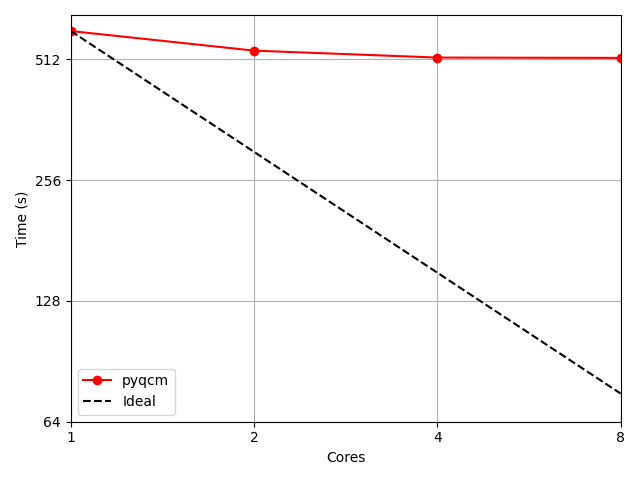
Figure 1: Parallel performance of the Exact Diagonalisation solver for calculation. Using pyqcm version 2.2.4.
Results show parallelization of the Green function calculation is beneficial up to 8 threads, but adding more and more threads reduce the effective speedup. Efficiency of the parallelization in this case is low (8 times more ressources only decrease the calculation time by 15%). Larger Hamiltonian are in general better suited to parallel processing.
Numerical integration
The following figure compares parallelization performance on a simulation which spend most of its time in the numerical integration. Test was performed on a 2 x 48 cores AMD EPYC 7463 @ 2.30GHz server and with 3 different BLAS library implementation (Intel MKL, OpenBLAS and BLIS) controled by the FlexiBLAS abstraction layer.
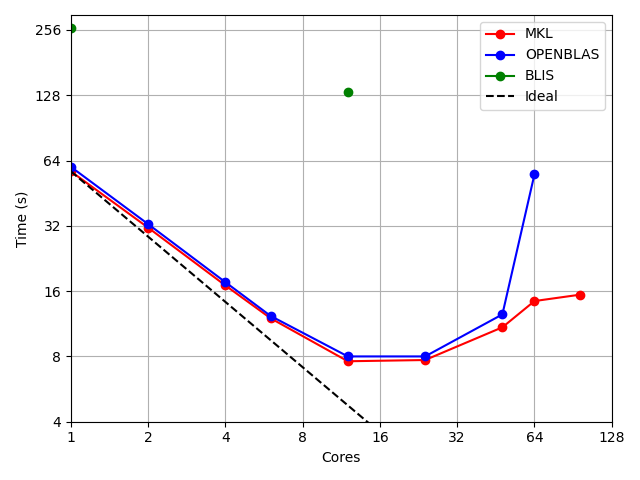
Figure 2: Parallel performance of pyqcm integration part (version 2.2.4) using OpenMP via the OMP_NUM_THREADS environment variable and with different BLAS library.
Results show the parallelization of the integration section is beneficial up to an optimal number of threads. In the present case, using more than 12 threads will increase the calculation time and is therefore not recommended. The optimal number of threads depends of the problem and its size.
Note that the integration section can use the Cuba parallelization capability. However, while OpenMP used the same object in memory to perform calculation in parallel, CUBA rather duplicate the object in the memory, resulting in a significant memory consumption. Cuba parallelization is therefore not recommanded.
Concurrent use of ressources
Some of the operation done by pyqcm require large data transfert between the memory and the CPU. Thus, launching several instance of pyqcm at the same time may bottleneck these transfert and increase the calculation time. The following figure shows how the calculation time increases against the number of running concurrent pyqcm instances. Each instance is a duplicate of the numerical integration test above using 4 threads. Test was ran on a 2 x 48 cores AMD EPYC 7463 @ 2.30GHz server with the OpenBLAS implementation.
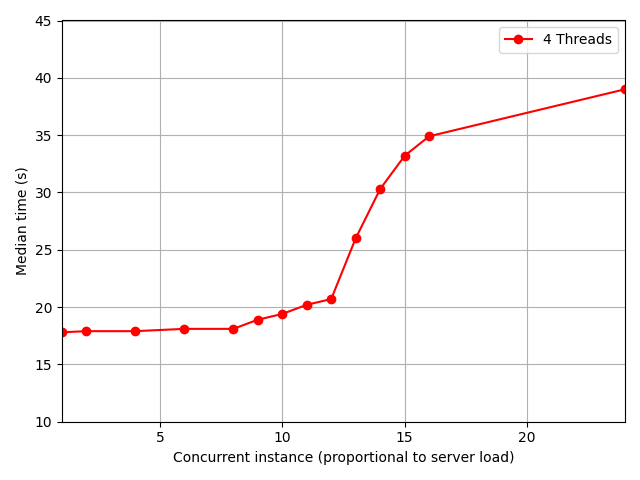
Figure 3: Median wall clock time per instance of pyqcm runned concurrently. 24 concurrent instances saturate the server.
This result illustrates that on shared system, a higher load could increase the calculation time.
Conclusion
It is recommanded to use OpenMP parallelization and controlling the number of thread using the environment variable
OMP_NUM_THREADS=X, and set no BLAS parallelization with[MKL,OPENBLAS,BLIS]_NUM_THREADS=1. CUBA parallelization is disable by default.Because of bad performance with BLIS implementation of BLAS operation, user might use either MKL or OpenBLAS library.
It always exists an optimal number of threads depending of the problem and its size.
Exact diagonalisation solver and integration optimal number of threads might be different so user can conduct a parallel study to know the right number of threads to choose.
The higher the charge on shared server, the highter the calculation time.
Objective on shared system would be to maximize the throughout of the server, i.e. is it acceptable to ask 2 times more ressources for only 10% lesser calculation time ?